






















Understanding Machine Embroidery DesignsEmbroidery Designs
A beginner-friendly guide to size, density, stitch count, colors, formats, and more
Welcome
You find an embroidery design you love, download it, load it into your machine...and then realize it is too big for your hoop. Or maybe it fits perfectly, but when you stitch it, the design feels much heavier than you expected. This happens to almost everyone when they're learning machine embroidery. When you're looking at an embroidery design, there is actually quite a bit of information that can help you know what to expect before you ever start stitching.
- design size
- hoop size
- stitch count
- density
- number of colors
- color changes
- embroidery file format
You don't need to become a digitizer to understand any of this. You just need to know what those numbers mean and which ones are important for your project. Let's walk through them.
Start With the Actual Design Size
One of the first things you should look at is the width and height of the embroidery design. Example: A design might measure

- 25" wide x
- 80" high.
Those measurements tell you the actual area the embroidery will cover when stitched at its original size. This is important for two reasons. First, the design has to fit inside your machine's embroidery area. Second, the design needs to be the right size for the item you're embroidering. A 3-inch design may look perfect on a hand towel but tiny in the center of a large tote bag. Before downloading a design, it helps to actually picture those measurements on your project. You can even use a ruler to get a quick idea of how much space the design will take up.
Design Size and Hoop Size Are Not the Same Thing
This is an important distinction.
If a design says it fits a 4" x 4" hoop, that does not necessarily mean the design itself measures exactly 4" x 4". The actual embroidery area of a hoop is usually slightly smaller than its advertised hoop size, and the usable sewing field varies by machine. For example, a design that is approximately
- 8" x
- 5" may be listed as fitting a 4" x 4" hoop.
That is why you should always look at the actual width and height of the design, not just the hoop category. And remember: your machine determines what size designs it can stitch. If your machine has a maximum 4" x 4" embroidery field, you cannot stitch a 5" x 7" design just by putting a larger hoop on the machine. The machine itself must support that larger embroidery area.
What Is Stitch Count?
The stitch count tells you approximately how many stitches are in the embroidery design. Example: Stitch Count: 7,850 That means your machine will make around 7,850 stitches to complete that design. It is easy to assume that a higher stitch count automatically means a better design. It doesn't. A simple outline design may only need a few thousand stitches, while a detailed filled design of the same physical size may need many more. The stitch count gives you clues about how the design was created and how much stitching is involved. It can also give you a general idea of how long the design may take to stitch. But stitch count should never be looked at by itself. You also need to consider the size and style of the design.

What Does Density Mean in Machine Embroidery?
This is one of those embroidery terms that sounds much more technical than it needs to. Density: how closely the stitches are placed together. Think about coloring something with a marker. If you make your lines very close together, you completely cover the paper underneath. If the lines are farther apart, you may be able to see some of the paper showing through. Embroidery works in a similar way.
A design with closely packed stitches has more coverage and feels heavier. A design with stitches spaced farther apart feels lighter. The important thing to know is: more density is not automatically better. If stitches are packed too tightly together, the embroidery can become stiff, cause the fabric to pucker, or even make stitching more difficult. If the density is too light, the fabric may show through where you don't want it to. A well-digitized design balances the amount of coverage with the fabric, thread, and overall look of the design.
Can You Tell Density From the Stitch Count?
Not exactly. Two designs can be the same size and have completely different stitch counts. Imagine two 4-inch flower designs. One is a simple redwork-style flower made mostly from running stitches. The other has completely filled petals and leaves. They may both measure 4 inches, but the filled flower could have several times more stitches. That doesn't necessarily mean it is too dense. It simply uses more stitches because more of the design is filled. Beginner tip: Look at size + stitch count + design style together instead of judging stitch count alone.
Why Some Designs Feel Heavier Than Others
Have you ever picked up an embroidered item and noticed that the embroidery feels very soft and flexible, while another design feels almost like a patch? A lot of that comes down to the way the design was digitized. A design with large filled areas, multiple layers of stitching, lots of underlay, or closely spaced stitches will usually feel heavier than a light outline or redwork design. Underlay is stitching that goes underneath the visible embroidery to help support the stitches on top. You usually don't see it when the design is finished, but it plays an important role in helping the embroidery sit properly on the fabric. Underlay also adds stitches to the total stitch count. This is another reason you cannot judge an embroidery design by stitch count alone.
What Do the Number of Colors Mean?
A design listing will usually tell you how many thread colors are used. Example: Colors: 6 That means the design was created using six thread colors. But here's something beginners sometimes don't realize: you do not always have to use those exact colors. If the design shows a blue flower and you'd rather make it purple, use purple. The color chart is there to guide you through the stitching order. Changing the colors is one of the easiest ways to make an embroidery design your own.
Colors and Color Stops Aren't Always the Same Thing
You may also see the term color stop or color change. A color stop tells the machine when one section of stitching is finished and it's time to move to the next section. Sometimes the same thread color may be used more than once during a design.
- Green
- Yellow
- Red
- Green again
That design has four color stops, even though it only uses three actual thread colors.
This becomes especially important with in-the-hoop (ITH) and applique designs because some color stops may be there for construction steps rather than simply changing thread. Always look at the color chart or instructions when a project includes more than ordinary decorative stitching.
Does the Design Fit Your Fabric?
Just because a design fits your hoop doesn't necessarily mean it's a good choice for every fabric. Think about the weight of the embroidery compared with the fabric. A light running-stitch design may work beautifully on a lightweight fabric. A very detailed design with thousands of tightly packed stitches may need a more stable fabric and stronger stabilizer. This doesn't mean you can't embroider detailed designs on clothing or softer fabrics. It just means the fabric needs enough support for the embroidery you're asking it to hold. As you get more experience, you'll start looking at a design and thinking, "That's a pretty heavy design - I'm going to need good support behind that."
That instinct comes surprisingly quickly.
Be Careful When Resizing Embroidery Designs
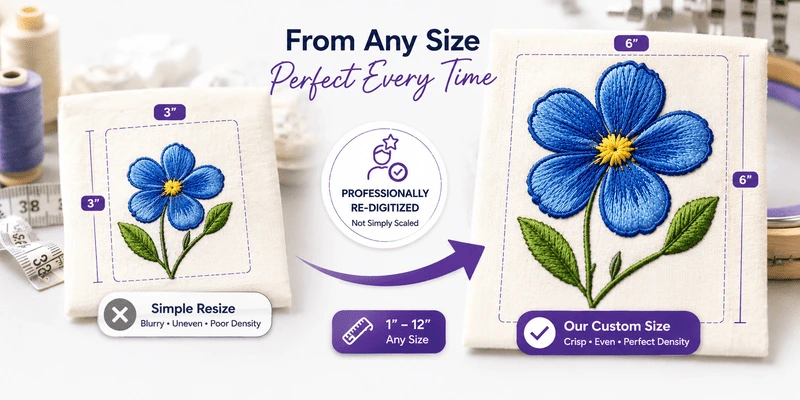
This is probably one of the most important things to understand about embroidery designs. An embroidery design isn't the same as a regular picture. If you make a photograph larger on your computer, the image changes size. But an embroidery design contains actual stitch information. When you change the size, you're changing the relationship between those stitches. If you make a design much larger without adding stitches, the stitches can spread too far apart and leave gaps. If you make it much smaller without removing stitches, those stitches can become packed too closely together. That's where density becomes important again. A good beginner rule is to be conservative with resizing, especially when a design contains lots of fill stitches, satin stitching, or fine detail. Easiest beginner choice: Choose a design that is already close to the size you need.
Enlarging or shrinking a design by more than about 10–20% can distort its density and underlay, since those settings were calculated for the original size. For bigger size changes, dedicated embroidery software (see our guide, Do You Need Embroidery Software?) can recalculate stitches more accurately than a simple resize.
What Is an Embroidery File Format?
The embroidery file format tells your machine how to read the design. Different embroidery machine brands use different formats.

There are others too. You don't need to understand how the file itself works. You just need to know which format your machine reads. Think of it a little like plugging the right charger into your phone. The design might be perfect, but your machine still needs the correct file type to use it. Check your embroidery machine manual if you're not sure which format you need.
Look at the Design Information Before You Download
One of the best habits you can develop as a beginner is taking a few seconds to look at the design information before downloading. When design information is available, look for details such as dimensions, stitch count, hoop size, available formats, and color information. Before choosing a design, check:
- Will it fit my machine's embroidery area?
- Is it the right physical size for my project?
- Does my machine support the file format?
- Is it a light outline design or a more heavily filled design?
- How many colors or color changes are involved?
Those few questions can tell you a lot.
Don't Be Afraid of Higher Stitch Counts
It's worth saying this because beginners sometimes start avoiding designs when they see a large stitch count. A high stitch count isn't necessarily a warning sign. Some types of embroidery naturally use lots of stitches. Freestanding lace (FSL), for example, can be very stitch-intensive because the thread itself creates the finished piece rather than simply decorating a piece of fabric. A detailed animal portrait will naturally have more stitches than a simple outline heart. What matters is whether the design has been digitized appropriately for what it is supposed to do.
Your First Designs Should Be Easy to Read and Easy to Stitch
When you're just starting out, you don't need to choose the most detailed design you can find. Look for something that:
- comfortably fits your hoop
- isn't extremely dense or heavily layered
- has a manageable number of color changes
- works well on a stable fabric
- doesn't require complicated construction
- is already close to the size you need A simple design gives you the chance to focus on learning your machine instead of trying to troubleshoot a difficult project at the same time.
There will be plenty of time for the complicated designs later.
When in Doubt, Do a Test Stitch
Even experienced embroiderers test designs.
A test stitch, sometimes called a sew-out, means stitching the design on a scrap or sample before embroidering the final item. This is especially useful when:
- you're using a design for the first time
- you're trying a new fabric
- you've resized the design
- you're unsure about stabilizer
- you're using specialty thread
- the final item would be difficult or expensive to replace
Your test doesn't have to be beautiful. You're looking to see how the design behaves.
- Does the fabric pucker?
- Are the filled areas smooth?
- Is the lettering clear?
- Does any fabric show through?
- Does the design feel too stiff?
It's much nicer to discover a problem on scrap fabric than on the front of your favorite sweatshirt.
The Easy Beginner Rule
When you're looking at an embroidery design, don't judge it by the picture alone. Take a few seconds to check the information behind it.
- Size - Will it fit my hoop and my project?
- Stitch count - How much stitching is involved?
- Design style - Is it an outline, filled, applique, FSL, or another type?
- Colors - How many thread colors or stops will I work through?
- Format - Can my machine read the file?
- Density - Does the amount of embroidery make sense for the fabric I want to use?
And if you're thinking about resizing it, be conservative. The more you embroider, the faster you'll get at reading this information. Eventually you'll look at a design listing and have a pretty good idea of how that design is going to stitch before you ever turn on your machine. And that's a really useful skill to have.
Ready to find your next project? Browse our free embroidery designs to practice, or explore designs with instructions for extra guidance as you go.
No. Stitch count reflects how the design was digitized. Look at size, style, and density together.
Be careful. Large size changes without proper software adjustments can leave gaps or pack stitches too tightly.
Confirm design dimensions, hoop/sewing field fit, file format, density/style, and how many color changes are involved.