














































PROJECT INSTRUCTIONS


PROJECT INSTRUCTIONS

3D Planter Decor Embroidery Project
By
Starbird Inc.
on
August 30, 2013
Description
3D Planter Decor
Step
of
Materials
Project Preview Video

QUICK VIEW
Applique Nature Critters Embroidery Bundle – Bee, Butterfly, Dragonfly & More (10 Designs)
$26.95
$16.17
Circle Price: $16.17

QUICK VIEW
Bee 3D Planter
$6.95
$3.48
Circle Price: $3.33

QUICK VIEW
Butterfly 3D Planter
$6.95
$3.48
Circle Price: $3.33

QUICK VIEW
Dragonfly 3D Planter
$6.95
$3.48
Circle Price: $3.33

QUICK VIEW
Frog 3D Planter
$6.95
$3.48
Circle Price: $3.33

QUICK VIEW
Hummingbird 3D Planter
$6.95
$3.48
Circle Price: $3.33

QUICK VIEW
Sunflower 3D Planter
$6.95
$3.48
Circle Price: $3.33

QUICK VIEW
Fish 3D Planter
$6.95
$1.99
Circle Price: $1.84

QUICK VIEW
Ladybug 3D Planter
$6.95
$1.99
Circle Price: $1.84

QUICK VIEW
Star 3D Planter
$6.95
$1.99
Circle Price: $1.84

QUICK VIEW
Sun 3D Planter
$6.95
$1.99
Circle Price: $1.84
Tear Away Stabilizer
$7.98
Circle Price: $7.18

| Materials 3D Planter Décor design Fabric for applique (we used broadcloth) Tearaway backing Embroidery thread Bobbin thread to match top thread color 12" crafter's dowel Floral tape (if desired or paint) Hot glue gun & hot glue Spray adhesive Scissors |
| Designs used in this project |
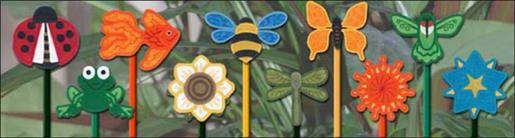
| Final Product: What You Will Create |
 |
|
Projects You May Like
Meet the Author:
Starbird Inc.

Starbird Inc. has been digitizing custom embroidery designs for over 25 years. They have seen so many wonderful and creative designs over the years that Starbird decided to create some of their own embroidery stock designs. Starbird Inc. is having a great time creating new and imaginative ideas and would like you to be able to enjoy them also.
Feedback
Characters Remaining
Please Login to Submit a Feedback
Invalid Characters, Please enter a valid Comment
Please enter a valid Comment
Reviewed On
Link is Broken, Please check the URL