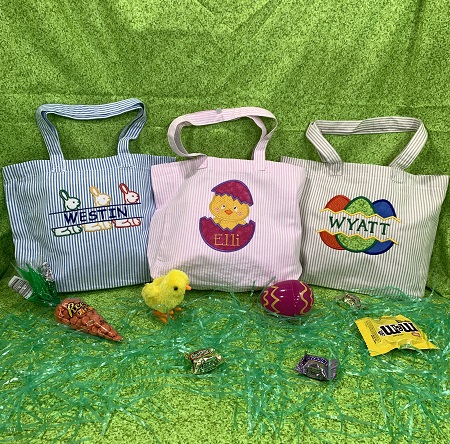
EASTER BAG 1: Gather & prepare the materials needed for the 'Appliqued Hatchling Chick' design. Read the directions before you begin the project. Iron and lightly starch the fabric. Iron the bags/tote if needed.
Step 2:
An embroidery software program was utilized to add a name to the design. Loop font was used for the name. Decide where you want the name and add it to the design. Save the design to a jump drive that you use with your embroidery machine.
(Click Image to Enlarge)
Step 3:
An essential tool for embroidery position and placement is a design template. A design template is a printout of the actual size of the design. It has the center of the design identified, as well as the horizontal and vertical axis lines. An embroidery program can print a template of any design. (Embrilliance Essentials embroidery software program was used to print the design template). Print a design template.
Step 4:
Follow package directions to bond the Hot Fix adhesive to the 4"x4" yellow fabric and the 4"x6" complimentary or seasonal fabric.
Step 5:
Center the design template on the bag. Pin the template to the fabric.
Step 6:
Hoop one piece of cut away stabilizer. Center the bag onto the stabilizer. Use a light mist of temporary adhesive spray to secure the bag to the stabilizer. Add pins or wonder pins to hold the bag securely in place.
Step 7:
Applique Embroidery decoratively stitches one fabric on top of another. Applique embroidery designs include a placement stitch, a tack down stitch, and a finishing stitch for each piece of fabric. These stitches are usually in different colors on the color chart so that the machine will stop after each step. Color 1 is a placement stitch. Stitch Color 1.
Step 8:
Place the 4"x4" yellow blender fabric over the placement stitches. Make sure that the fabric covers all of the stitches.
Step 9:
Color 2 is the tackdown stitches. Embroider Color 2.
Step 10:
Remove the hoop from the machine. DO NOT remove the project from the hoop. Use applique scissors to carefully trim the excess fabric from around the stitches. Re-attach the hoop to the machine.
Step 11:
Color 3 is a finishing stitch. Embroider Color 3.
Step 12:
Color 4 is a placement stitch. Embroider Color 4.
Step 13:
Place the 4"x6" complimentary fabric over the placement stitches. Make sure that the fabric covers all of the stitches. Stitch Color 5. Color 5 is the tack down stitches.
Step 14:
Remove the hoop from the machine. DO NOT remove the project from the hoop. Use applique scissors to carefully trim the excess fabric from around the stitches. Re-attach the hoop to the machine. Color 6 is the finishing stitches. Embroider Color 6.
Step 15:
Color 7 is placement stitches. Embroider Color 7. Place the remaining piece of the 4"x6" complimentary fabric over the placement stitches. Make sure that the fabric covers all of the stitches. Stitch Color 8. Color 8 is the tack down stitches. Remove the hoop from the machine. DO NOT remove the project from the hoop. Use applique scissors to carefully trim the excess fabric from around the stitches. Re-attach the hoop to the machine.
Step 16:
(Click Image to Enlarge)
Use the color guide to finish embroidering the design.
Step 17:
After the design has completed stitching, remove the project from the hoop. Carefully trim excess stabilizer from around the design. Trim any long threads if needed. Use a hot iron on the appliqued fabric to bond it to the bag.
Step 18:
Congrats! You have completed a personalized Easter bag.
Step 19:
EASTER BAG 2: The same process will be used to make the other bags. The only difference is that the name will be inserted into the split in the name drop design. Gather & prepare the materials needed for the 'Applique Easter Egg Name Drop' design. Read the directions before you begin the project. Iron and lightly starch the fabric. Iron the bags/tote if needed.
Step 20:
An embroidery software program (Embrilliance Essentials) was utilized to add a name to the design. Save the design to a jump drive that you use with your embroidery machine.
Step 21:
Follow package directions to bond the Hot Fix adhesive to the three 4"x3" pieces of fabric.
Step 22:
Use the design template as a placement guide on the bag. Pin the template in place on the bag.
Step 23:
Hoop one piece of cut away stabilizer. Center the bag onto the stabilizer. Use a light mist of temporary adhesive spray to secure the bag to the stabilizer. Add pins or wonder pins to hold the bag securely in place.
Step 24:
Embroider the placement stitches.
Step 25:
Place one 4"x6" piece of fabric over the placement stitches. Make sure the stitches are covered with the fabric.
Step 26:
Embroider the tack down stitches.
Step 27:
Remove the hoop from the machine. DO NOT remove the project from the hoop. Use applique scissors to carefully trim the excess fabric from around the stitches. Re-attach the hoop to the machine. Embroider the finishing stitches.
Step 28:
Repeat the process for the next egg. Embroider the placement stitches. Place the fabric over the placement stitches. Embroider the tack down stitches. Remove the hoop from the machine. DO NOT remove the project from the hoop. Use applique scissors to carefully trim the excess fabric from around the stitches. Re-attach the hoop to the machine. Embroider the finishing stitches.
Step 29:
Repeat the process for the last egg. Embroider the placement stitches. Place the fabric over the placement stitches. Embroider the tack down stitches. Remove the hoop from the machine. DO NOT remove the project from the hoop. Use applique scissors to carefully trim the excess fabric from around the stitches. Re-attach the hoop to the machine. Embroider the finishing stitches.
Step 30:
Use the color guide to finish embroidering the design.
Step 31:
After the design has completed stitching, remove the project from the hoop. Carefully trim excess stabilizer from around the design. Trim any long threads if needed. Use a hot iron on the appliqued fabric to bond it to the bag.
Step 32:
Congrats! You have completed a name drop design.
Step 33:
EASTER BAG 3: Follow the same process to make the 'Easter Bunny Name Split' design. Gather and prepare the materials. Iron the bag if needed. Add the name to the design. Bond the SF101 super flex interfacing to the back of the felt. The SF101 adds stability and density to the felt.
Step 34:
Use the design template as a placement guide on the bag. Hoop one piece of cut away stabilizer. Center the bag in the hoop. Use wonder pins to secure the bag to the stabilizer.
Step 35:
Follow the applique steps to make the rabbits. After the rabbits have been appliqued, finish embroidering the design.
Step 36:
After the design has completed stitching, remove the project from the hoop. Carefully trim excess stabilizer from around the design. Trim any long threads if needed.
Step 37:
Congrats! You have completed the 'Easter Bunny Name Split' design.
Step 38:
Great job! You have used an applique embroidery technique to make personalized Easter bags.
Marisa Littleton is a retired educator with a love for teaching and learning. Interests include machine embroidery, hand embroidery, quilting, cooking, and antiques.